WezTerm で Cmd+k から Claude Code を呼び出してコマンドを生成する
WezTerm で Cmd+k を押すと小さい入力欄が出てプロンプトを元に Claude Code が zsh の1行コマンドにしてくれて、そのままターミナルの入力欄に貼り付けられるようにした。ようは Cursor の Cmd+k のパクリである
完成系
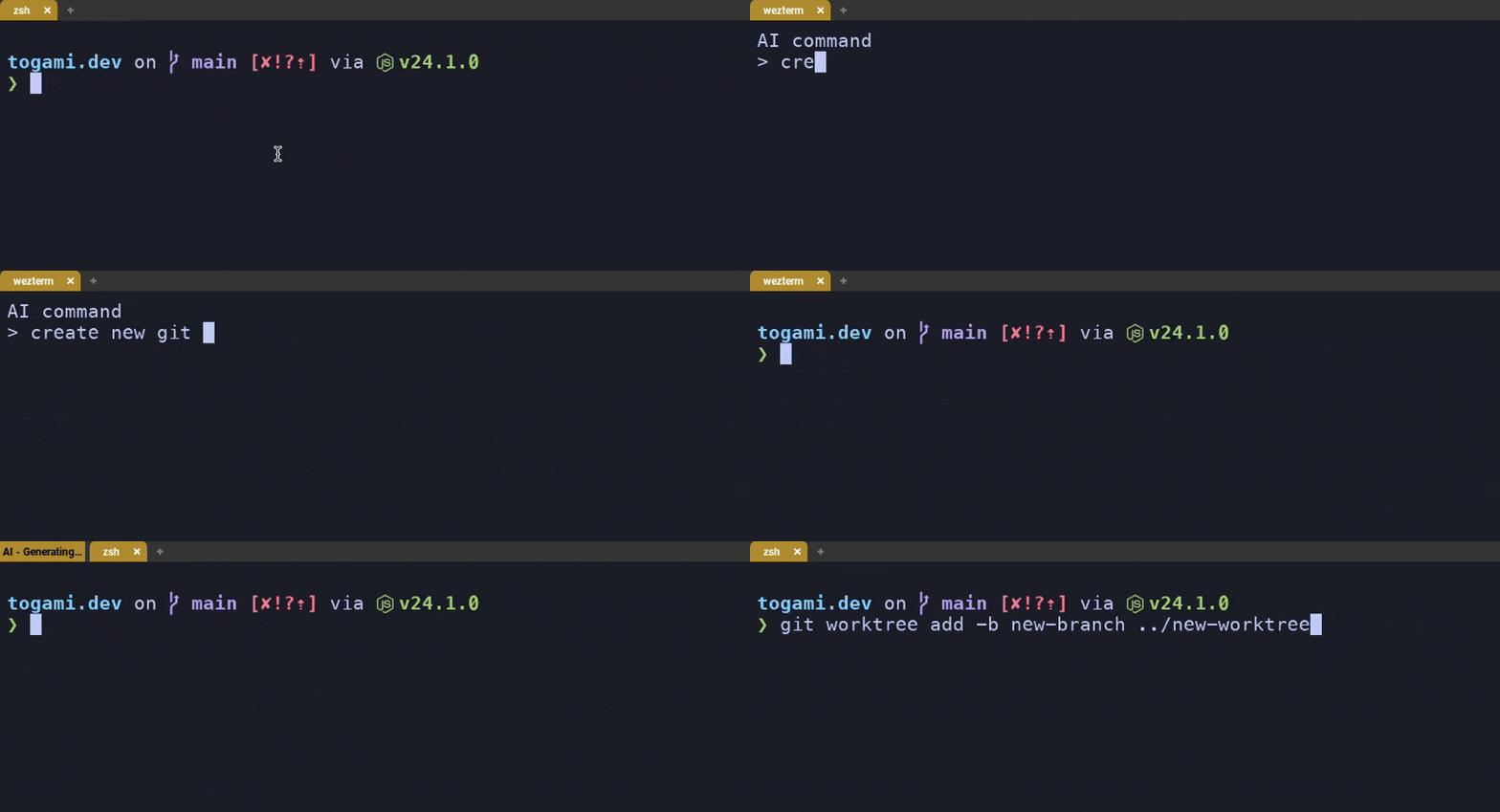
仕組み
やっていることは単純で、
wezterm.action.PromptInputLineでプロンプト入力wezterm.run_child_processでclaude --printを実行して stdout を受け取る- 返答から1行コマンドだけ抜き出して
SendStringで貼り付ける(改行なし) - 実行中は左ステータスでスピナーを回して目立たせる
claude のパスは which claude の結果をそのまま使った。
local wezterm = require 'wezterm';
local act = wezterm.action

local claude_bin = "<path to claude>" -- set this to the full path of your claude executable
local claude_model = "claude-haiku-4-5-20251001"

keys = {
  {
    key = 'k',
    mods = 'CMD',
    action = act.PromptInputLine {
      description = 'AI command',
      action = wezterm.action_callback(function(window, pane, line)
        if not line or line == "" then return end

        local prompt =
          "Return only a single-line zsh command. No explanation, no markdown, no code fences. Command only.\n" ..
          "Request: " .. line

        local ok, out, err = wezterm.run_child_process({
          claude_bin,
          "--print",
          "--no-session-persistence",
          "--model", claude_model,
          "--output-format", "text",
          "--tools=",
          prompt,
        })
        if not ok then return end

        window:perform_action(act.SendString(extract_command(out)), pane)
      end),
    },
  },
}
注意点として次のようなことがあります
--printを使って対話を避ける--tools=でツールを無効化して、純粋に「コマンド文字列だけ」を返すように寄せる- Claude が ``` を付けてくることがあるので
extract_command()で剥がす - 改行を送るとそのまま実行されるので送らない
スピナーは左ステータスを使って、wezterm.time.call_after で再描画しています。
local ai_status_by_window_id = {}
local ai_spinner_frames = { "|", "/", "-", "\\" }

local function set_left_status_formatted(window, elements)
  window:set_left_status(wezterm.format(elements))
end

local function start_ai_spinner(window)
  local window_id = window:window_id()
  ai_status_by_window_id[window_id] = { frame = 1, active = true }

  local function tick()
    local state = ai_status_by_window_id[window_id]
    if not state or not state.active then return end

    local spinner = ai_spinner_frames[state.frame]
    state.frame = (state.frame % #ai_spinner_frames) + 1

    set_left_status_formatted(window, {
      { Background = { Color = "#ae8b2d" } },
      { Foreground = { Color = "#000000" } },
      { Text = " AI " .. spinner .. " Generating… " },
    })

    wezterm.time.call_after(0.15, tick)
  end

  tick()
end

local function stop_ai_spinner(window)
  local window_id = window:window_id()
  if ai_status_by_window_id[window_id] then
    ai_status_by_window_id[window_id].active = false
    ai_status_by_window_id[window_id] = nil
  end
end
もし動かない時は WezTerm のデバッグオーバーレイ(Ctrl+Shift+L)を開いてログを見てデバックができる。