Exploring the TypeScript Compiler Part 4: Roslyn and the Red-Green Tree
This is Part 4 of an expanded and revised version of the tskaigi 2026 Day 2 talk, “A History of TypeScript Compiler Design Through Constraints and Historical Context”.
- Part 0: Overview
- Part 1: Why Go?
- Part 2: Inside the TypeScript Compiler
- Part 3: Why TypeScript?
- Part 4: Roslyn and the Red-Green Tree
- Part 5: JavaScript Madness🫠
- Part 6: What Go Unlocks
Whether a person or an agent edits source code, the change usually affects only a small part of a large syntax tree. A tool needs to recalculate only the parts related to that change and give feedback quickly.
Think of an IDE or editor. Its work does not always start at the root of the tree. It must respond quickly to the part the user is editing or pointing to. When code changes, type errors should appear soon. When the cursor is over a name, hover information should be ready.
Without a better approach, every edit would make the tool walk the tree from its root and recalculate the whole project. That would be like running npx tsc on the entire project after every key you press.
C# Roslyn
Roslyn, the C# compiler, found an interesting way to meet these needs.
dotnet/roslyngithub.com/dotnet/roslynFor outside tools, traditional compilers were like black boxes. You could give them source code and get object files or assemblies, but there was often no good API for accessing the results of analysis during compilation. A great deal of useful information was in memory while the compiler ran, but outside tools could not see it, and it disappeared when the compiler finished.
Roslyn grew from the idea of making those results available through an API so other development tools could use them.
Roslyn Overviewgithub.com/dotnet/roslyn/blob/main/docs/wiki/Roslyn-Overview.mdIt needed to work as a compiler, offer access to analysis results through an API, and respond fast enough for tools. The Red-Green Tree is a design that helps meet these needs.
The blog post Persistence, façades and Roslyn’s red-green trees is a useful source on this design. Let's look at the five properties it says the data structure needed.
1. Immutable
An immutable value cannot be changed after it is created. To change its contents, you create a new value instead.
Here is a JavaScript example of an update that leaves the original object alone:1
const a = { name: "koupenchan", age: 9 };
const b = { ...a, age: 10 }; // Create a new object without changing a
You may have written a React state update like this:
const [user, setUser] = useState({
  name: "Koupenchan",
  address: {
    city: "Toronto",
    country: "Canada",
  },
});

setUser({
  ...user,
  address: {
    ...user.address,
    city: "Vancouver",
  },
});
By comparison, a mutable update changes the original object:
const a = { name: "koupenchan", age: 9 };
a.age = 10;
Immutability works well with caching. If data cannot change, a result calculated from it is easier to reuse. It also makes data safe to share: several analyses can read the same data at once without one of them changing it during another's work.
2. The Form of a Tree
Because the structure represents program source code, it needs to have the form of a tree.
3. Cheap Access to Parent Nodes from Child Nodes
Think about normal work in an editor or IDE. Analysis often starts at any file or node the user has opened. Analyzing everything before showing a result would be slow.
One way to support this is to give each node a pointer to its parent. A tree normally has links from parents to children. With links in both directions, a tool can quickly find the current location and nearby context, such as the function or scope that contains a node.
4. Map a Node to a Character Offset
The tool needs to find a node's position in the original source code. To underline an error or refactor code, it must know which part of the text the node represents.
5. Persistence
Persistence means that an older version of a data structure remains usable after an update. With the immutable update from point 1, the old value is left alone. If we keep a reference to it, we can still use the old version. We do not have to keep every version forever; we can release versions we no longer need.
const a = { name: "koupenchan", age: 9 };
a.age = 10; // The old state is no longer available through a
const oldVersion = { name: "koupenchan", age: 9 };
const newVersion = { ...oldVersion, age: 10 };
console.log(oldVersion.age); // 9
console.log(newVersion.age); // 10If syntax tree nodes are immutable, old and new trees can safely refer to the same unchanged nodes. Keeping a reference to the old root lets us use the old tree after an edit.
Structural Sharing
The previous section described persistence as keeping the old version available. The original blog post uses the term more specifically for reusing most existing nodes after an edit. Structural sharing makes this reuse efficient.
By persistence I mean the ability to reuse most of the existing nodes in the tree when an edit is made to the text buffer. Since the nodes are immutable, there’s no barrier to reusing them, as I’ve discussed many times on this blog. We need this for performance; we cannot be re-parsing huge wodges of text every time you hit a key. We need to re-lex and re-parse only the portions of the tree that were affected by the edit because we are potentially re-doing this analysis between every keystroke.
An editor must handle frequent changes to small parts of a tree. As the quote explains, it cannot parse the whole tree again after every key press.
Memory use matters too. Immutability brings benefits, but a simple implementation can also have costs. Consider this small tree for C# source code:
CAUTION
The examples below use C#. The syntax trees are simplified and do not show the actual implementation.
var t = 1 * 2 + 4;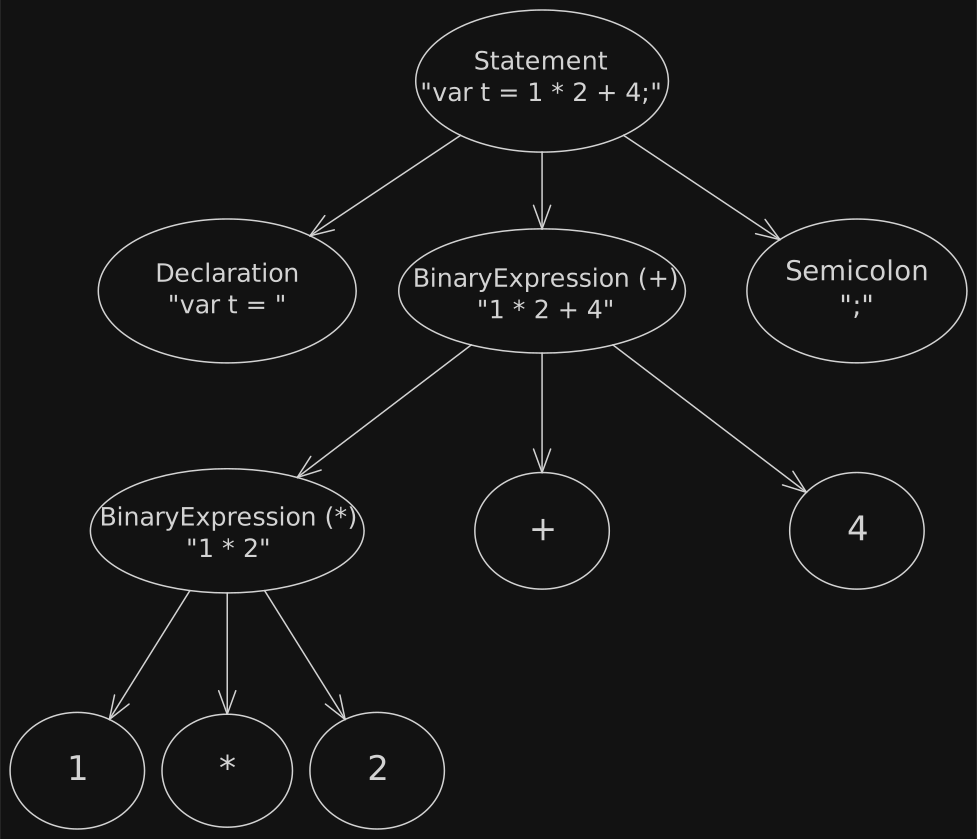
var t = 1 * 2 + 4;Now suppose we change 4 to 6. To keep the old values immutable, we create a new tree. Because the 4 node changes, its ancestors for 1 * 2 + 4 and var t = 1 * 2 + 4 must be created again too.
var t = 1 * 2 + 6;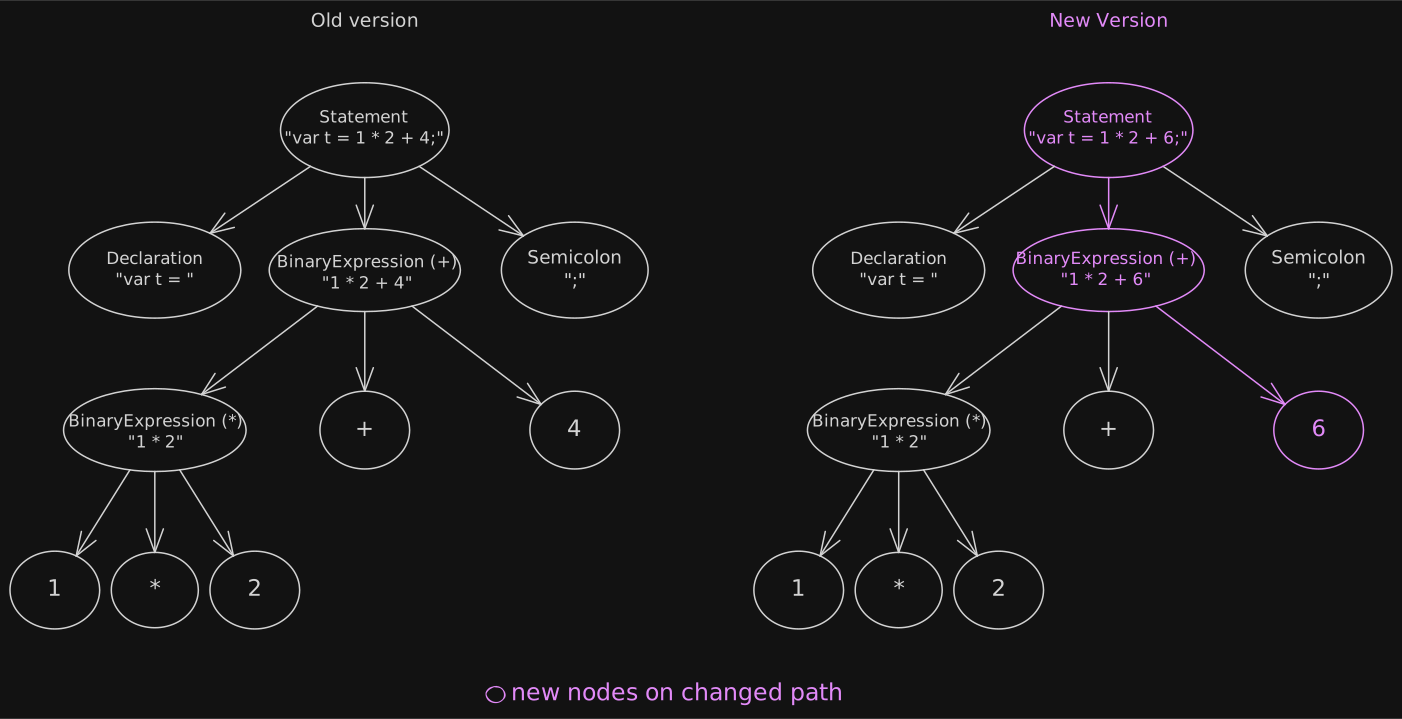
4 to 6Only one small part changed, so most of the tree still has the same shape. We could copy the entire tree and keep both versions, but that would also copy parts that did not change. Imagine doing this after many edits in a much larger project. Memory use could grow quickly.
Instead, notice that most of the tree is often unchanged. Because the nodes are immutable, the old and new versions can safely share them. We can simply reuse the unchanged parts.
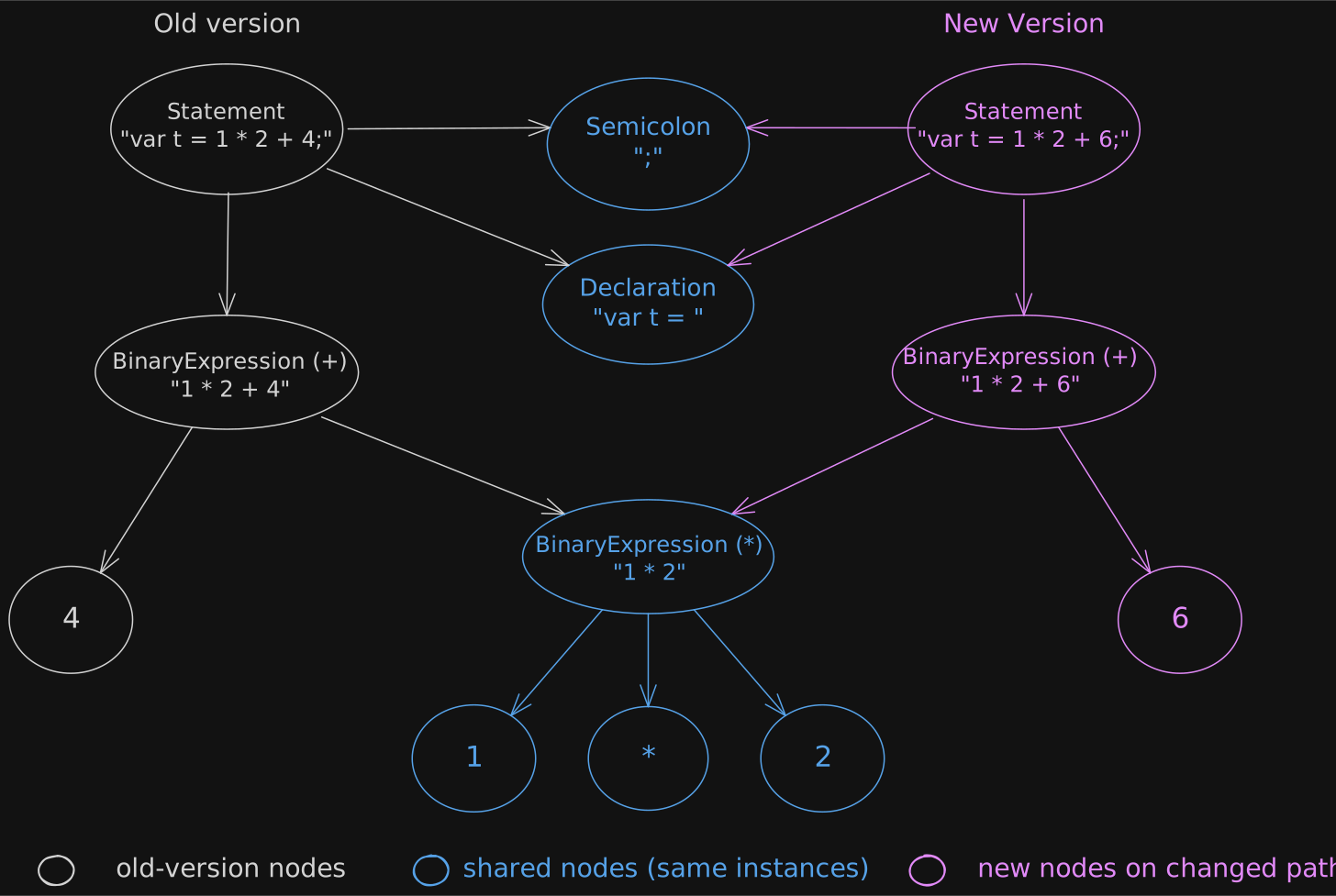
This keeps the old version and its immutable nodes available while using less memory than copying the whole tree.
The Problems with Combining These Properties
We have seen the five properties the design needs. But it is difficult to build a tree that is immutable and persistent, yet also offers parent pointers and keeps details such as comments.
First, parents and children must refer to each other while remaining immutable. Our earlier examples had links only from parents to children. With links in both directions, a parent needs its child to be created, while the child needs its parent. Neither can be changed later. Which one can we create first?
Second, links to parents make structural sharing harder. If we change 4 to 6, we would like to share the unchanged left side of the tree. With one-way links, we can share everything except the changed node and its ancestors. But if the left subtree also points to its parent, 1 * 2 + 4, that link must change when we create a new parent. So the unchanged subtree must also be created again.
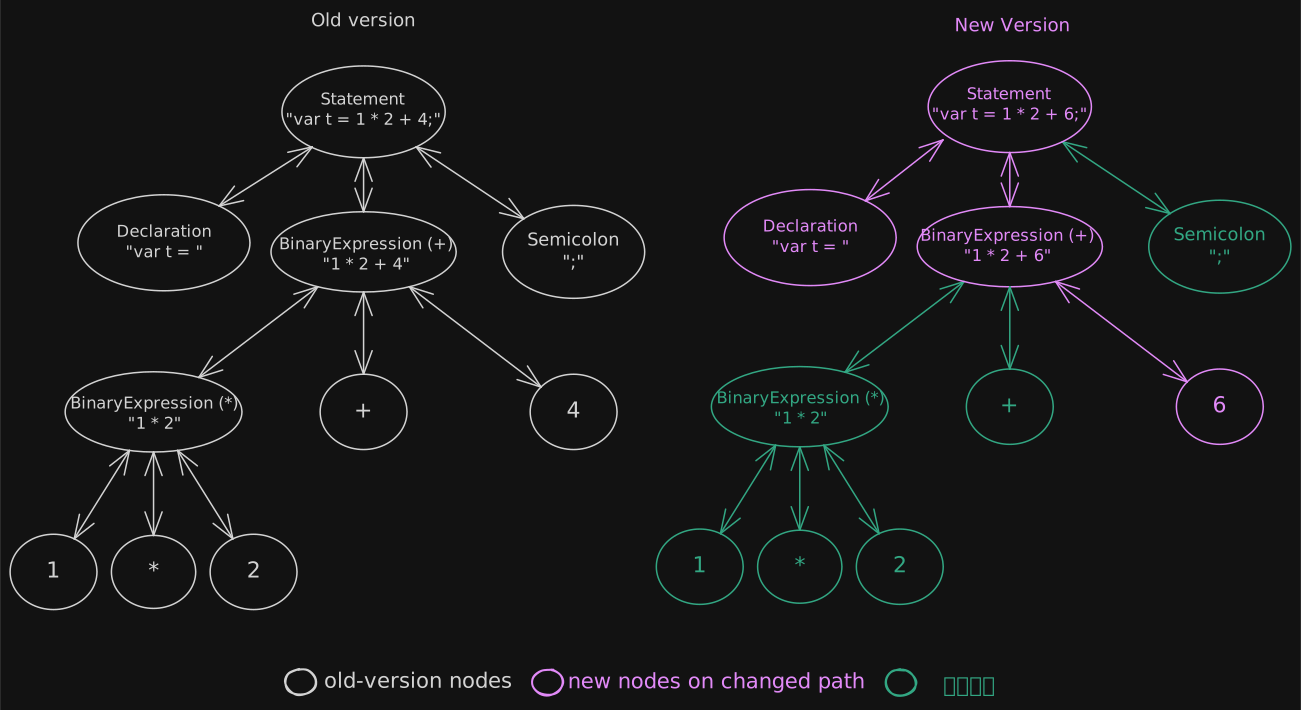
Third, storing exact positions can force us to create many new nodes after a small edit. Position data is needed to:
- Underline errors.
- Support actions such as Rename, Go to Definition, and Refactoring.
- Report that an error is at characters 10–14.
Suppose each node stores its starting position in the source text. If we rename t to total, the starting positions of 1 * 2 + 4 and ; move four characters to the right. Because we cannot change an existing immutable node just to update its position, we must create new nodes across the tree.
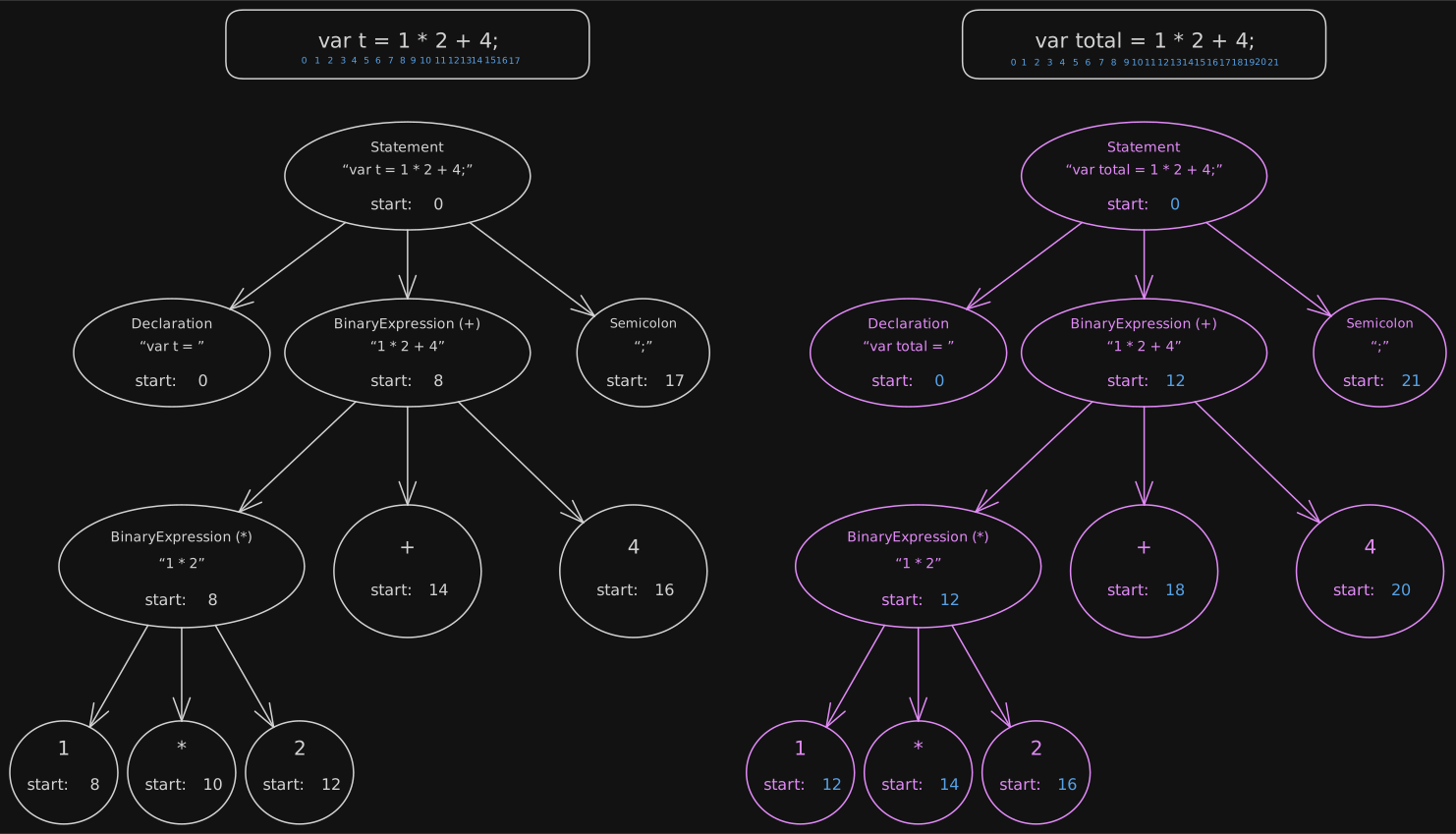
t to total shifts the positions of later nodesThe Red-Green Tree
These examples show why the properties are hard to combine. The Red-Green Tree is one answer to this problem.
Green Tree
The Green Tree has these features:
- It is immutable and persistent.
- A node stores its own width, its children, and trivia such as spaces and comments.
- It does not store an exact position.
- It does not store a parent pointer.
It holds the syntax, can share unchanged parts, is safe to read at the same time from several places, and makes older versions easy to keep. Storing width instead of position is especially important.
Suppose we change var t = 1 * 2 + 4; to var total = 1 * 2 + 4;. With exact positions, later nodes would move. With widths, we only need to create new nodes along the path from the edit to the root. Children outside that path keep the same width, so we can reuse them.
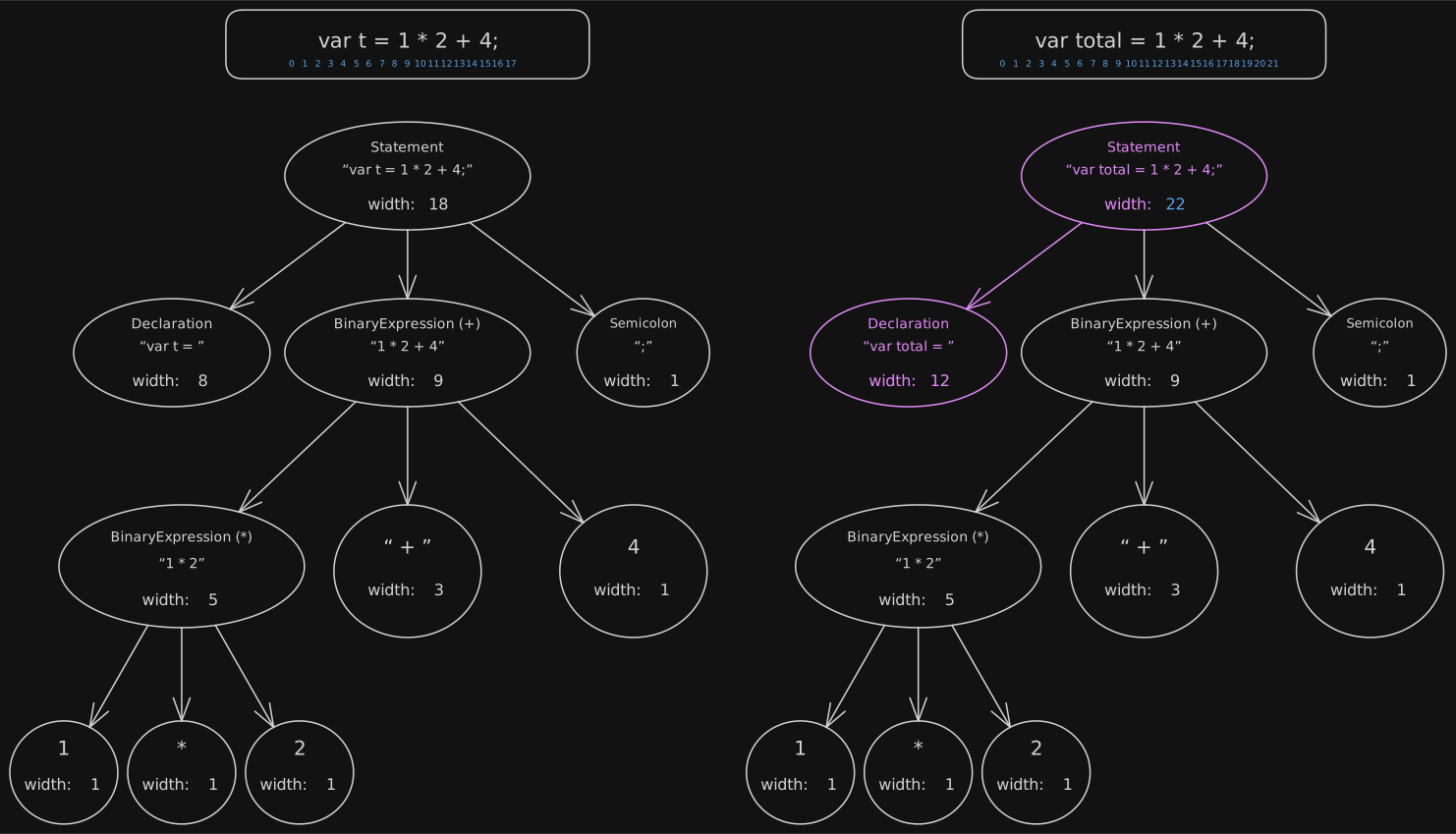
Red Tree
The Red Tree wraps the Green Tree and has two main features:
- It stores parent links and exact positions.
- It creates wrappers for child nodes only when they are needed.
This gives a tool quick access to the context it needs. A node's position is found by adding the widths of the nodes and text that come before it along the path through its parents and siblings.
For example, let's find the position of 4 in var t = 1 * 2 + 4;.
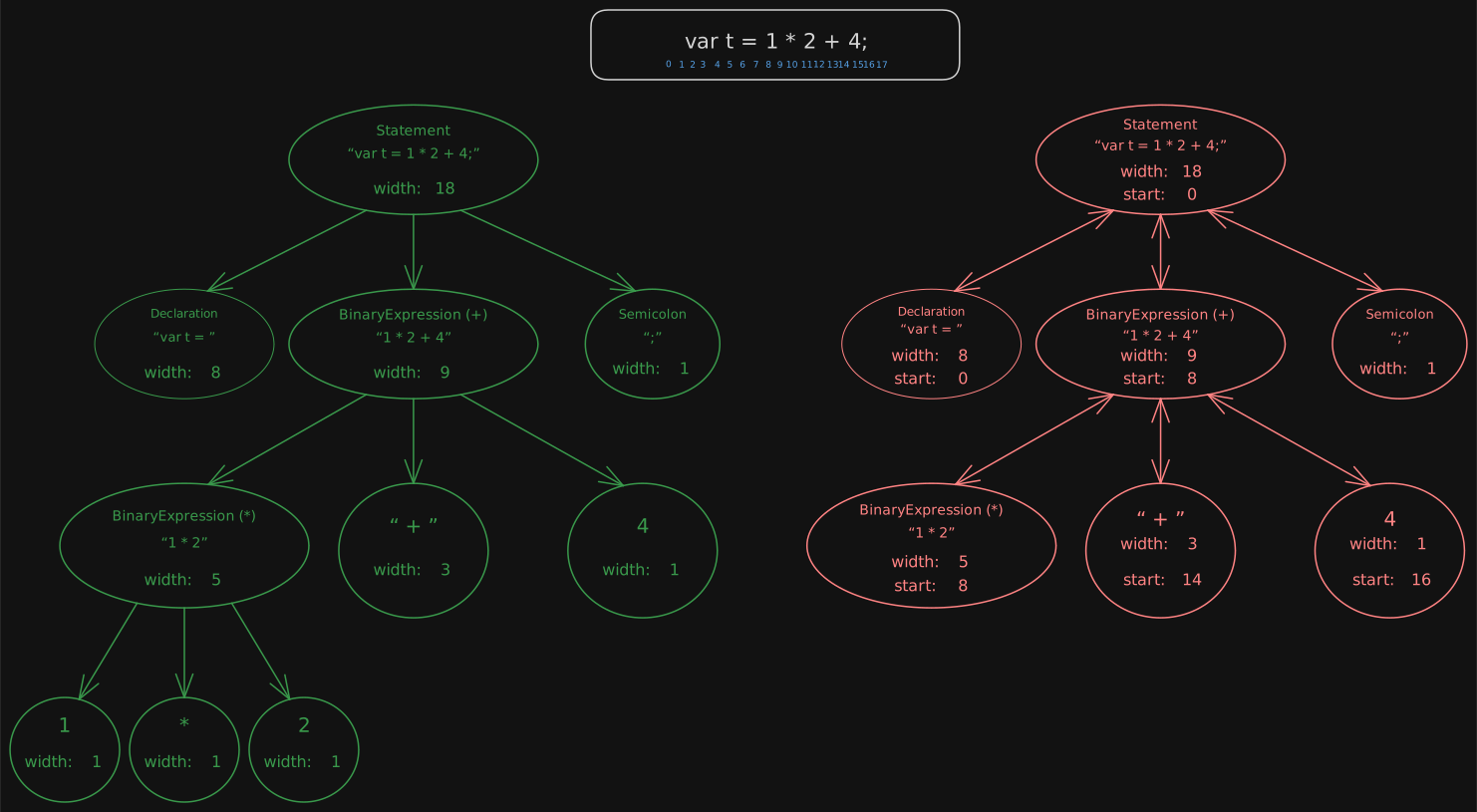
The root starts at position 0. Before the expression 1 * 2 + 4, var t = takes seven characters and the following space takes one. So the expression starts at position 8.
To find 4, add the width of 1 * 2 (five characters) and the width of + (three characters) to the expression's start: 8 + 5 + 3 = 16. Following the path also tells us which node is the parent of 4. In simplified form, its Red node looks like this:
var redNode = new RedNode
{
    GreenNode = greenNode,
    Position = 16,
    Parent = binaryExpression
};
There is no need to wrap every Green node at once. Red nodes can be created only along the path to a node whose context is needed.
After an edit, new Red nodes are created for the new Green Tree as needed. A tool that still holds the old Red Tree can keep using the old version.
Green nodes have no parent or exact position, so versions can share them. Red nodes hold the parent and position for one version. Together, they allow structural sharing and quick access to context.
Next
We have seen how Roslyn's Red-Green Tree combines properties that help it work with an IDE. Yet the TypeScript compiler did not choose this design, even though it came later. Next, we will look at why it made a different choice and how JavaScript shaped that choice.
Footnotes
-
This example shows the idea of an immutable update, but the objects themselves are not immutable.
constonly prevents assigning a new value to the variable. ↩